Lesson 18 · 18 of 20
JSON and regular expressions · Python
Read and write JSON with Python's json module and pull data out of a log with regular expressions: named groups, findall and sub.
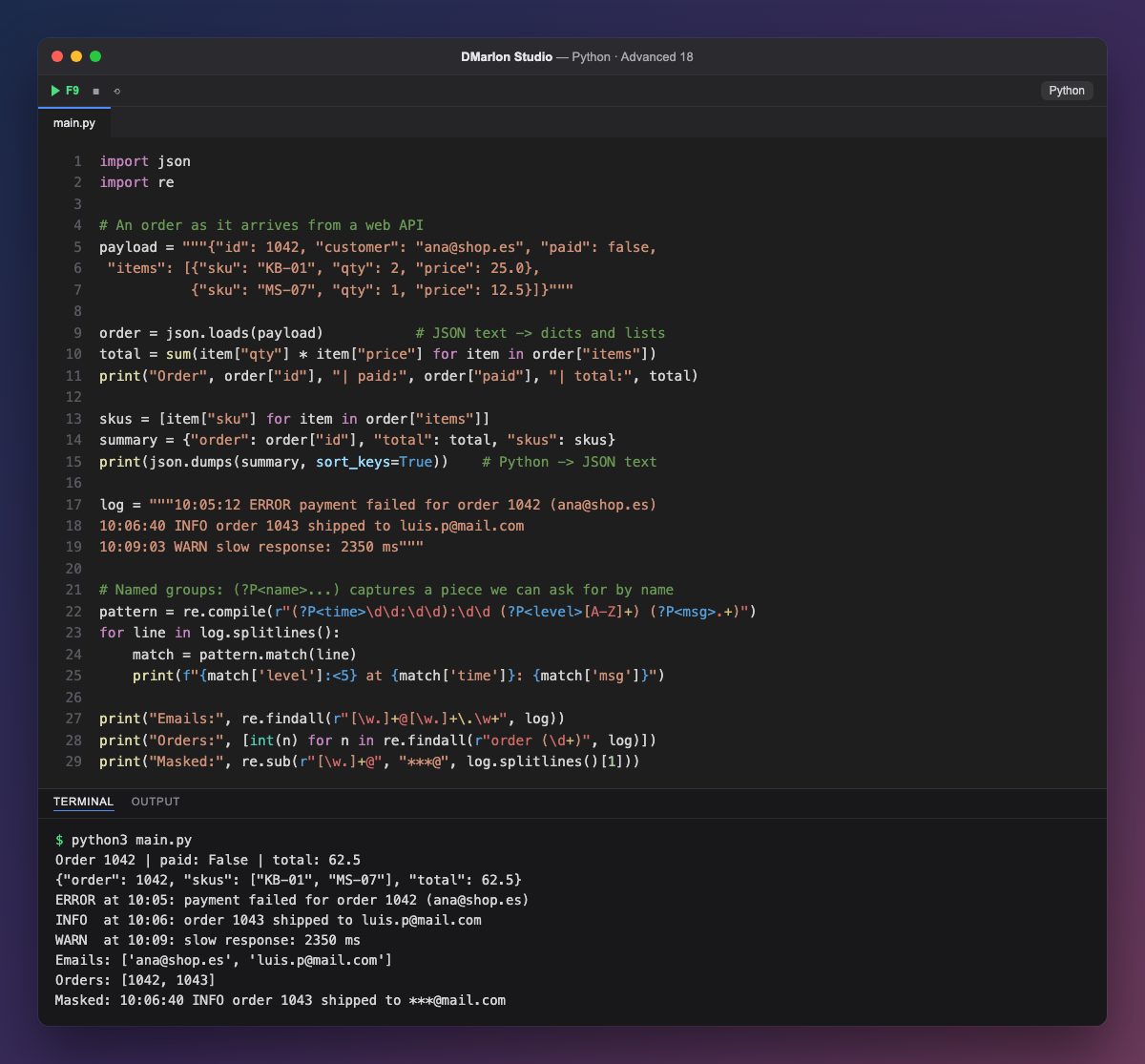
JSON is the text format almost every web API speaks. `json.loads()` turns that text into Python objects: JSON objects become dictionaries, arrays become lists and false becomes False. From there, order["items"] is looped over like any other list to work out the total.
`json.dumps()` goes the other way. With sort_keys=True the keys come out sorted, which helps when comparing results; indent=2 would add indentation for easier reading. For files there are json.load() and json.dump(), without the s.
Regular expressions describe text patterns. re.compile() prepares a pattern once so you can use it many times. \d is a digit, [A-Z]+ one or more capital letters and .+ the rest of the line. `(?P<time>...)` is a named group: whatever it matches is retrieved with match["time"]. pattern.match(line) tries the pattern from the start of the line.
`re.findall()` returns everything that matches in the text. In the email pattern, [\w.]+ means letters, digits, underscores or dots; when the pattern has a group in parentheses, as in order (\d+), it returns only the group, which the program converts to int.
`re.sub()` replaces whatever matches: here it hides the part of the email before the at sign. Pattern strings start with r (raw strings) so backslashes reach re unchanged.
Code · main.py
import jsonimport re# An order as it arrives from a web APIpayload = """{"id": 1042, "customer": "ana@shop.es", "paid": false, "items": [{"sku": "KB-01", "qty": 2, "price": 25.0}, {"sku": "MS-07", "qty": 1, "price": 12.5}]}"""order = json.loads(payload) # JSON text -> dicts and liststotal = sum(item["qty"] * item["price"] for item in order["items"])print("Order", order["id"], "| paid:", order["paid"], "| total:", total)skus = [item["sku"] for item in order["items"]]summary = {"order": order["id"], "total": total, "skus": skus}print(json.dumps(summary, sort_keys=True)) # Python -> JSON textlog = """10:05:12 ERROR payment failed for order 1042 (ana@shop.es)10:06:40 INFO order 1043 shipped to luis.p@mail.com10:09:03 WARN slow response: 2350 ms"""# Named groups: (?P<name>...) captures a piece we can ask for by namepattern = re.compile(r"(?P<time>\d\d:\d\d):\d\d (?P<level>[A-Z]+) (?P<msg>.+)")for line in log.splitlines(): match = pattern.match(line) print(f"{match['level']:<5} at {match['time']}: {match['msg']}")print("Emails:", re.findall(r"[\w.]+@[\w.]+\.\w+", log))print("Orders:", [int(n) for n in re.findall(r"order (\d+)", log)])print("Masked:", re.sub(r"[\w.]+@", "***@", log.splitlines()[1]))Output · python3 main.py
Order 1042 | paid: False | total: 62.5
{"order": 1042, "skus": ["KB-01", "MS-07"], "total": 62.5}
ERROR at 10:05: payment failed for order 1042 (ana@shop.es)
INFO  at 10:06: order 1043 shipped to luis.p@mail.com
WARN  at 10:09: slow response: 2350 ms
Emails: ['ana@shop.es', 'luis.p@mail.com']
Orders: [1042, 1043]
Masked: 10:06:40 INFO order 1043 shipped to ***@mail.com
Key points
json.loadsturns text into objects;json.dumpsdoes the reverse.- Write patterns as raw strings:
r"\d+". (?P<name>...)captures a piece you can ask for by name.findallreturns every match;subreplaces them.re.compileprepares a pattern you use many times.
Exercise
Use a named group to pull the milliseconds out of the WARN line and print a warning if they are over 2000.