Lesson 9 · 9 of 20
The menu bar · tkinter
Build a tkinter window's menu bar with tk.Menu: cascading menus, separators, shortcuts, check items and radio items.
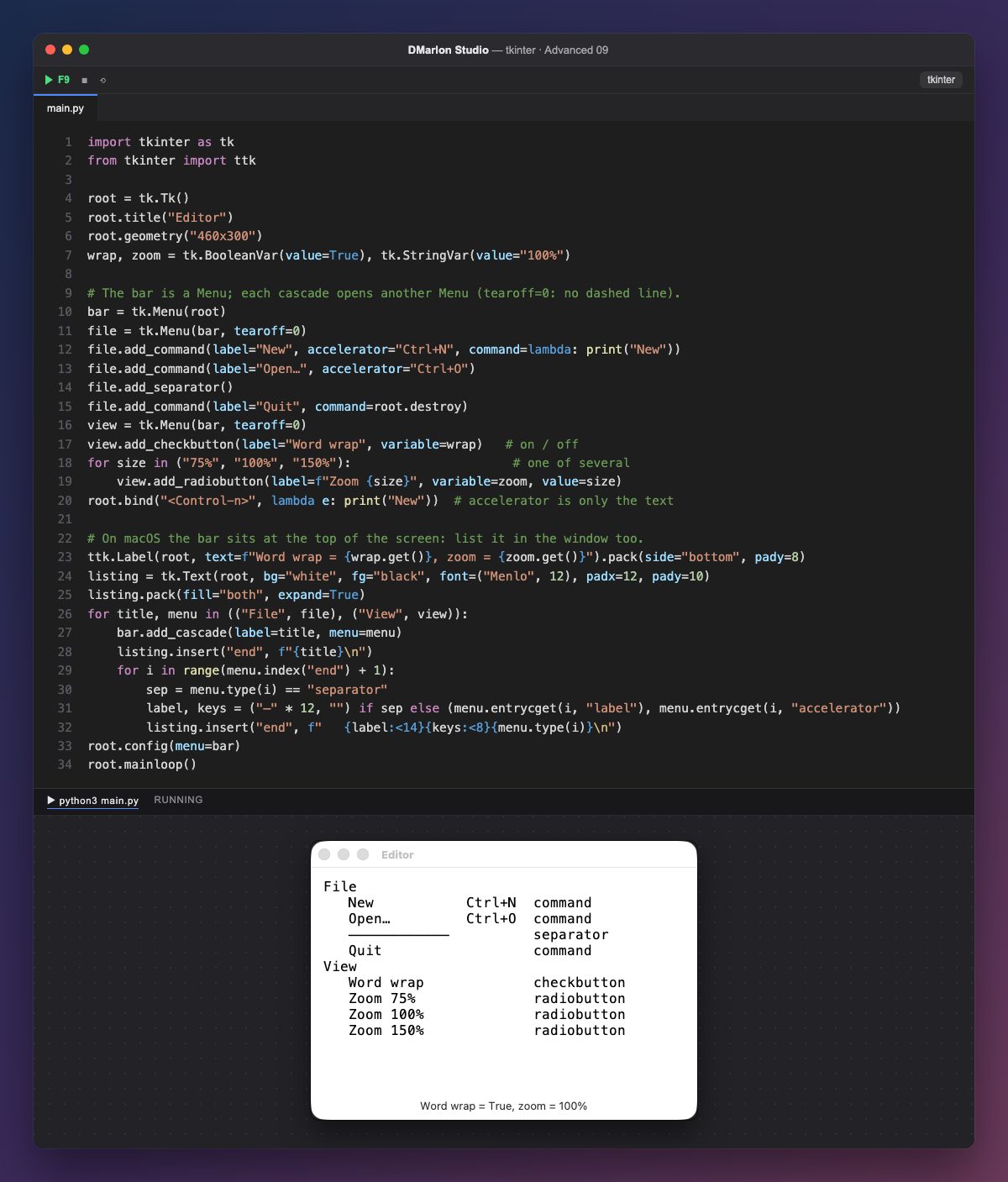
The bar is a tk.Menu set on the window with root.config(menu=bar). Each drop-down menu is another tk.Menu hung from it with add_cascade(label="File", menu=file). tearoff=0 removes the dashed line that, on Windows and Linux, lets you tear the menu off into a little window.
Inside go the entries: add_command (an action; command= is the function it runs), add_separator (a line) and two kinds with state: add_checkbutton, toggled on and off and tied to a BooleanVar, and add_radiobutton, one of several sharing the same StringVar (the one matching the current value, 100%, is ticked).
accelerator="Ctrl+N" only writes the shortcut next to the entry; for the key to work you need root.bind("<Control-n>", ...). That is why the example does both.
On macOS the menu bar is not inside the window but at the top of the screen, so the example walks the menus and writes them into a Text: index("end") gives the last index, type(i) each entry's kind and entrycget(i, "label") its text.
In DMarlon Studio it is the Menu in the palette: type the entries in the inspector, with submenus and separators, and the studio generates the tk.Menu with its cascades and sets it on the window; each entry calls a method with its path.
Code · main.py
import tkinter as tkfrom tkinter import ttkroot = tk.Tk()root.title("Editor")root.geometry("460x300")wrap, zoom = tk.BooleanVar(value=True), tk.StringVar(value="100%")# The bar is a Menu; each cascade opens another Menu (tearoff=0: no dashed line).bar = tk.Menu(root)file = tk.Menu(bar, tearoff=0)file.add_command(label="New", accelerator="Ctrl+N", command=lambda: print("New"))file.add_command(label="Open…", accelerator="Ctrl+O")file.add_separator()file.add_command(label="Quit", command=root.destroy)view = tk.Menu(bar, tearoff=0)view.add_checkbutton(label="Word wrap", variable=wrap) # on / offfor size in ("75%", "100%", "150%"): # one of several view.add_radiobutton(label=f"Zoom {size}", variable=zoom, value=size)root.bind("<Control-n>", lambda e: print("New")) # accelerator is only the text# On macOS the bar sits at the top of the screen: list it in the window too.ttk.Label(root, text=f"Word wrap = {wrap.get()}, zoom = {zoom.get()}").pack(side="bottom", pady=8)listing = tk.Text(root, bg="white", fg="black", font=("Menlo", 12), padx=12, pady=10)listing.pack(fill="both", expand=True)for title, menu in (("File", file), ("View", view)): bar.add_cascade(label=title, menu=menu) listing.insert("end", f"{title}\n") for i in range(menu.index("end") + 1): sep = menu.type(i) == "separator" label, keys = ("─" * 12, "") if sep else (menu.entrycget(i, "label"), menu.entrycget(i, "accelerator")) listing.insert("end", f" {label:<14}{keys:<8}{menu.type(i)}\n")root.config(menu=bar)root.mainloop()Key points
root.config(menu=bar)puts the bar on the window.add_cascadehangs a menu andadd_commandadds an action.add_checkbuttonandadd_radiobuttonkeep their state in variables.acceleratoris just text: the shortcut needsbind.
Exercise
Add a "Help" menu with an "About" entry that prints a message, and make Ctrl+O work too.