Lesson 5 · 5 of 20
Treeview as a tree · tkinter
Build a folder tree with tkinter's ttk.Treeview: parent and child nodes, open or closed branches and a recursive function.
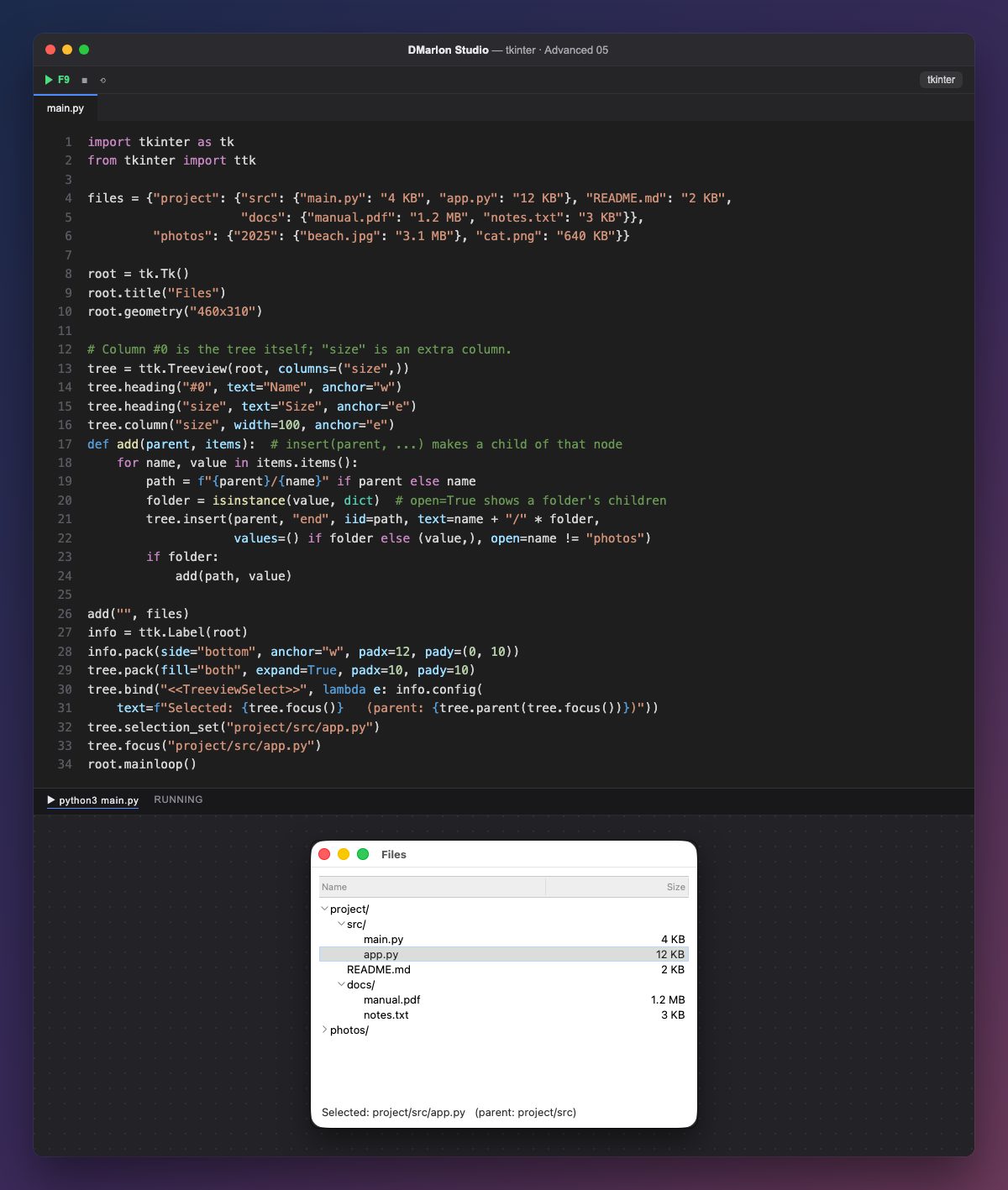
The same ttk.Treeview shows hierarchies. Here the #0 column is not hidden: it is the tree itself, with the arrows that open and close branches. heading("#0", ...) gives it a title, and size is one more column, on the right.
The data is dictionaries inside dictionaries: a folder is a dictionary and a file is its size. The add function walks through them and calls itself for each folder (it is recursive), so it works at any depth.
The key is the first argument of insert: the parent. With "" the node hangs from the root; with another node's id, it becomes its child. Each node uses its path (project/src/app.py) as its iid, so it is unique and easy to find. open=True leaves a folder open; here, all of them except photos.
text is what shows in the tree column and values fills the other columns (folders have no size). When a node is selected, the label shows its path and its parent's, given by parent(). There are also get_children(iid) for the children and item(iid, open=False) to close a branch.
In DMarlon Studio, the Data table in the palette is this same ttk.Treeview, set up as a table; trees are filled from code with insert(parent, ...), as here.
Code · main.py
import tkinter as tkfrom tkinter import ttkfiles = {"project": {"src": {"main.py": "4 KB", "app.py": "12 KB"}, "README.md": "2 KB", "docs": {"manual.pdf": "1.2 MB", "notes.txt": "3 KB"}}, "photos": {"2025": {"beach.jpg": "3.1 MB"}, "cat.png": "640 KB"}}root = tk.Tk()root.title("Files")root.geometry("460x310")# Column #0 is the tree itself; "size" is an extra column.tree = ttk.Treeview(root, columns=("size",))tree.heading("#0", text="Name", anchor="w")tree.heading("size", text="Size", anchor="e")tree.column("size", width=100, anchor="e")def add(parent, items): # insert(parent, ...) makes a child of that node for name, value in items.items(): path = f"{parent}/{name}" if parent else name folder = isinstance(value, dict) # open=True shows a folder's children tree.insert(parent, "end", iid=path, text=name + "/" * folder, values=() if folder else (value,), open=name != "photos") if folder: add(path, value)add("", files)info = ttk.Label(root)info.pack(side="bottom", anchor="w", padx=12, pady=(0, 10))tree.pack(fill="both", expand=True, padx=10, pady=10)tree.bind("<<TreeviewSelect>>", lambda e: info.config( text=f"Selected: {tree.focus()} (parent: {tree.parent(tree.focus())})"))tree.selection_set("project/src/app.py")tree.focus("project/src/app.py")root.mainloop()Key points
- Column
#0is the tree; the others arevalues. - The first argument of
insertis the parent. open=Trueleaves a branch open.- A recursive function handles any depth.
Exercise
Add a project/tests folder with two files, make it start closed and have README.md selected when the window opens.