Lesson 18 · 18 of 20
Separator, Message and Sizegrip · tkinter
Three small tkinter widgets: ttk.Separator to divide, tk.Message for text that wraps by itself and ttk.Sizegrip to resize.
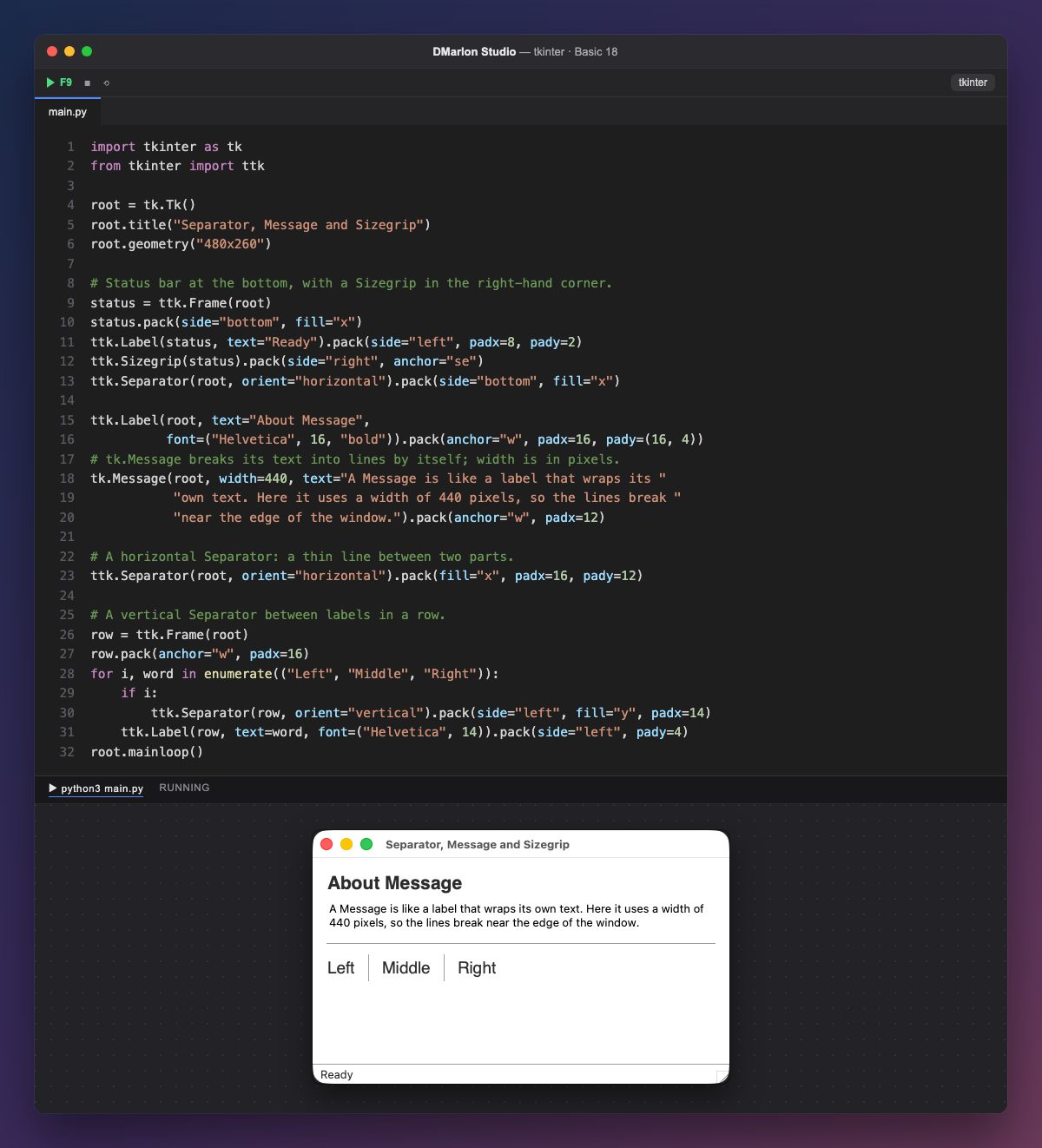
The status bar is packed first, with pack(side="bottom", fill="x"), so it always stays at the bottom: a frame with the text «Ready» on the left and, on the right, a `ttk.Sizegrip`, the corner handle you drag to resize the window.
A `ttk.Separator` is a thin dividing line. With orient="horizontal" and fill="x" it spans the full width: one separates the status bar from the rest and another sits below the text.
`tk.Message` is like a label, but it breaks its text into lines by itself. With width=440 (in pixels) the lines reach that width; without width, it uses aspect, the ratio between width and height (150 by default).
With orient="vertical" and fill="y", the separator divides a row, as between «Left», «Middle» and «Right». In the loop, if i: adds one before every word except the first (i is 0 on the first pass).
None of the three is in the DMarlon Studio palette; you can add them in the Code tab. For long texts, the studio's Label already has *Line wrap*.
Code · main.py
import tkinter as tkfrom tkinter import ttkroot = tk.Tk()root.title("Separator, Message and Sizegrip")root.geometry("480x260")# Status bar at the bottom, with a Sizegrip in the right-hand corner.status = ttk.Frame(root)status.pack(side="bottom", fill="x")ttk.Label(status, text="Ready").pack(side="left", padx=8, pady=2)ttk.Sizegrip(status).pack(side="right", anchor="se")ttk.Separator(root, orient="horizontal").pack(side="bottom", fill="x")ttk.Label(root, text="About Message", font=("Helvetica", 16, "bold")).pack(anchor="w", padx=16, pady=(16, 4))# tk.Message breaks its text into lines by itself; width is in pixels.tk.Message(root, width=440, text="A Message is like a label that wraps its " "own text. Here it uses a width of 440 pixels, so the lines break " "near the edge of the window.").pack(anchor="w", padx=12)# A horizontal Separator: a thin line between two parts.ttk.Separator(root, orient="horizontal").pack(fill="x", padx=16, pady=12)# A vertical Separator between labels in a row.row = ttk.Frame(root)row.pack(anchor="w", padx=16)for i, word in enumerate(("Left", "Middle", "Right")): if i: ttk.Separator(row, orient="vertical").pack(side="left", fill="y", padx=14) ttk.Label(row, text=word, font=("Helvetica", 14)).pack(side="left", pady=4)root.mainloop()Key points
ttk.Separatordraws a horizontal or vertical line.tk.Messagewraps its text by itself, withwidthoraspect.ttk.Sizegripis the handle for resizing the window.- Whatever uses
side="bottom"is packed before the rest.
Exercise
Replace width=440 with aspect=300 in the Message and compare how it lays out the text; then try aspect=100.